


AI in sales and marketing is often discussed at a feature level, like what it can generate or what it can automate.
But that’s not where the real change is happening.
The real shift in how work flows between marketing and sales and how fewer decisions now depend on humans remembering what to do next.
Today, HubSpot AI is changing workflows by removing friction, reducing guesswork, and improving execution consistency; not in one dramatic leap, but through dozens of small improvements that compound over time.
Let’s break this down.
The Workflow Problem Most Teams Don’t See And How HubSpot AI Resolves It
Most teams don’t struggle because they lack proper tools; they struggle because their workflows depend too much on humans managing everything manually.
Some common examples of such things include:
- Leads sit untouched after form fills
- Follow-ups are inconsistent
- Data quality degrades over time
- Sales and marketing operate on different versions of reality
And honestly, none of these are strategy problems; they’re execution problems. Here’s where HubSpot AI comes into play to resolve this error.
It focuses on workflow execution – specifically on increasing decision speed, consistency, and alignment. Let’s explore it in detail.
From Manual Workflows to Assisted Decision-Making with HubSpot AI Tools
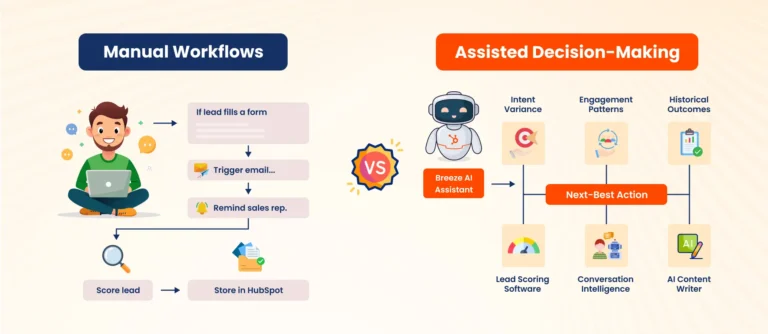
Traditional HubSpot workflows were rule-based. For example: If a lead fills a form, send an email; if a deal moves stages, notify sales, etc. This model works when funnels were simpler, and data volumes were lower.
However, as funnels grow, rule-based workflows start to rely on:
- Sales reps taking follow-ups
- Marketers for maintaining fragile rules
- RevOps teams are constantly fixing data gaps
This increases the chances of manual errors and slows down workflows due to over-dependency on humans.
To solve this, HubSpot AI tools introduce intent velocity, engagement patterns & historical outcomes, and surface the next-best action. This keeps the workflows running and helps teams make data-driven decisions.
Key HubSpot AI Tools that Enable this Shift
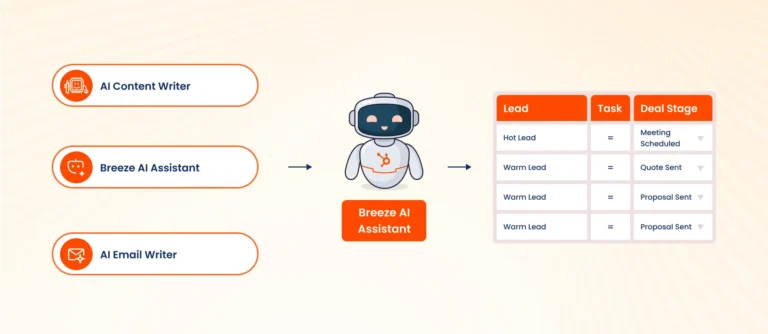
- Lead Scoring Software: AI-assisted engagement scoring helps sales reps identify and prioritize the best leads that are most likely to convert and close. They can use these lead scores to auto-prioritize tasks and trigger smarter workflows accordingly.
- Breeze: An AI companion that uses your CRM context to generate content, prep meeting notes, and build custom assistants for workflows. Use it to pull context into decisions rather than relying on memory.
- Conversation Intelligence: Transcription + analysis for calls that extracts objections, keywords, and deal signals. Feed these signals back into workflows and reports to prompt targeted follow-ups.
- AI Content Writer: Generate and refine emails, social posts, landing copy, and ad creative inside HubSpot, then wire those assets into AB tests and nurture flows for measurable lift.
- AI Customer Service Agent: It’s a part of the Breeze AI ecosystem. 24/7 qualified responses and lead qualification via chat; automatically routes high-intent conversations into sales workflows.
Using these AI tools results in faster follow-ups, accurate lead prioritization, less wasted efforts, and cleaner pipelines.
Ultimately, resulting in improved conversion rates, sales velocity, and forecast accuracy. Let’s understand how HubSpot AI changes sales and marketing workflows one by one.
How HubSpot AI Changes Sales Workflows
1. Prioritization becomes data-led, not reactive
Sales reps don’t need more information; they need clarity.
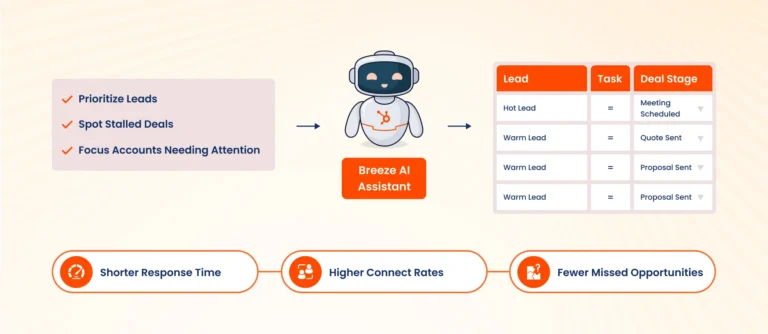
AI helps surface:
- Which leads are most likely to convert
- Which deals are stalling
- Which accounts need immediate attention
This results in shorter response times, higher connect rates, and fewer missed opportunities. Ultimately, sales efficiency improves because attention is allocated where it matters most.
2. Follow-ups become consistent by default
In many teams, follow-ups depend on memory. That creates risks, like:
- Hot leads cool off
- Deals stall silently
- Forecasts become unreliable
But with AI-supported workflows:
- Follow-ups are timely
- Nudges are consistent
- No lead disappears unnoticed
This reduces pipeline leakage, increases win rates, and improves revenue predictability to let your sales workflows scale with accuracy and ease.
3. Conversation insights feed back into the system
Sales conversations contain valuable information like objections, buying signals, competitive mentions, decision blockers, etc.
AI helps extract patterns from these interactions and make them usable, and makes it flow back to:
- Marketing messaging
- Sales enablement content
- Objection-handling frameworks
This ultimately improves team alignment and ensures every member is working on the same page.
How HubSpot AI Changes Marketing Workflows
1. Content creation becomes operational, not reactive
Most marketing teams struggle to create consistent content that scales with growing requirements.
HubSpot AI helps them by drafting:
- Email drafts
- Landing page copy
- Ad variations
- Blog outlines and summaries
Resulting in speedy outcomes, better campaign execution, and reduced dependency on individual contributors.
2. Personalization without manual complexity
Personalization often breaks down because it’s hard to maintain. AI helps here by adapting messaging based on:
- Engagement patterns
- Funnel stage behavior
- Past conversion signals
So, instead of managing dozens of static segments, teams can focus on prospect intent signals and draft personalized content accordingly.
This results in higher email engagement, more relevant landing page experiences, and improved lead-to-opportunity conversion.
3. Predictive lead scoring replaces assumptions
Traditional lead scoring is built on assumptions made from job titles, company size, page visits, form fills, etc.
But AI-driven scoring looks at patterns, not checklists. It evaluates:
- How similar leads converted historically
- Engagement depth over time
- Content sequencing
- Behavioral velocity
As an outcome, marketing teams don’t have to worry anymore about debate with the sales team over MQL definitions, and it gives better alignment on lead quality.
Here’s Where Using HubSpot AI Alone Isn’t Enough
AI does not fix broken systems, if:
- Lifecycle stages are unclear
- Sales and marketing definitions don’t match
- Core workflows are inconsistent
When AI is implemented on such systems, it simply scales inefficiencies faster, rather than resolving the actual issue.
Then what’s the right sequence of implementing HubSpot AI on your workflows?
Here’s the right way
Before enabling advanced HubSpot AI features inside your CRM, make sure to:
- Clean up lifecycle stages
- Align MQL, SQL, and pipeline definitions
- Standardize key workflows
- Fix data ownership
After that, AI will amplify what already works, without over-relying on manual interventions.
How to Adopt HubSpot AI Without Creating Chaos
Adopting HubSpot AI works best when it’s guided by experts with real-world experience.
At TRooInbound, we work closely with teams to design HubSpot-first workflows that are ready for AI to be implemented on them. We focus on making use of suitable AI tools that support your pipeline, sales efficiency, and RevOps alignment, without adding operational noise.
You can hire HubSpot developers to help you throughout the process of adopting HubSpot AI without creating any functional chaos in everyday operations.
In case you want to DIY, here are some primary steps to keep in mind before starting:
Recommended starting points:
- Predictive lead scoring
- Sales prioritization tools
- Content assistance for marketing
- Data quality improvements
Metrics to watch after implementing HubSpot AI in your workflows:
- Lead response time
- Lead-to-meeting conversion
- Sales cycle length
- Pipeline velocity
- Forecast accuracy
If AI doesn’t improve at least one of these, it’s not delivering value.
The Long-Term Shift: From Efforts to Effectiveness
From this blog, one thing is clear: HubSpot AI isn’t about doing more; it is about moving the workflow smoothly with less friction from constant manual guidance.
When AI is applied thoughtfully, it improves lead prioritization, which ultimately enhances workflows and teams gain visibility into pipeline health.
If you’re exploring HubSpot AI and want to ensure it actually improves conversions across teams, working with an experienced HubSpot Platinum Partner – TRooInbound can make that transition smoother.
At TRooInbound, we help teams design HubSpot workflows that are AI-ready, practical, and built around business outcomes – not experimentation.
If that sounds relevant, schedule a call with us at your preferred time and let’s discuss your exact goals to achieve through HubSpot AI.