


After the first 30 minutes of the HubSpot Spotlight session, Yamini Rangan surrendered the floor to Karen Ng, EVP of Products at HubSpot. That’s when the spotlight shifted to the most exciting reveal of INBOUND 25 – the introduction of Smart CRM, Data Hub, and the brand-new Breeze Agents.
In Part 1 of this Loop Marketing Playbook, Yamini explained the ‘why’ behind this new strategy. Now, in this Part 2, Karen will demonstrate the ‘how‘ with new HubSpot product updates that make building hybrid teams possible in real life.
In this blog, we’ll break Karen’s announcements in an easy-to-understand format, highlight what’s new, and explain why this matters for marketers, sales teams, and business leaders who want to grow with AI without losing human creativity.
Why Businesses Need Hybrid Teams?
At the beginning of the session, Karen picks up from where Yamini left:
“Q. What’s the role of humans and AI today?
A. It’s simple, humans lead with strategy, taste, and judgement, and AI’s role is to accelerate their implementation.”
When Humans and AI work together as a hybrid team, they will level the playing field for growing companies instead of widening the technological gap. And here’s where HubSpot and its latest AI CRM and tools come into play.
But many of you may think:
Why Choose HubSpot Even When Teams Can Build Their Hybrid Teams Anywhere?
Karen explains two major problems in teams building their hybrid teams without proper guidance:
- They choose one AI tool that does one thing well but lacks the context of other processes and cannot be interconnected.
- Or they bolt AI onto old systems that can’t match AI’s speed and keep falling and breaking.
In both instances, the hybrid teams keep losing context, and loop marketing doesn’t work without proper context.
HubSpot’s Take:
HubSpot makes context the foundation by unifying all your data across customers, deals, and activity in one place. With that foundation, your team gets simple, connected tools that fit how hybrid teams work.
Let’s see how to build your hybrid team with the new HubSpot’s AI tools as its core members.
The Hybrid Team Blueprint to Put Loop Marketing At Work
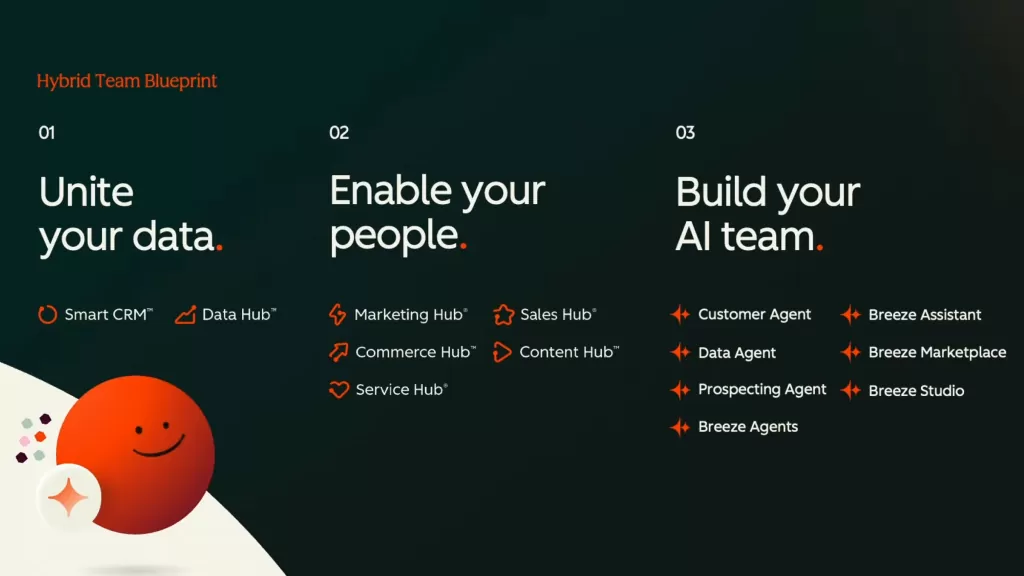
Karen’s blueprint to put the Loop to work has three steps:
- Unite your data. This gives you the context and foundation for everything you need in the loop.
- Enable your people. Provide the powerful tools that help them do what they do best.
- Build your AI team so people lead and AI accelerates.
Now let’s move forward and understand each step in detail.
Step 1: Unite Your Data
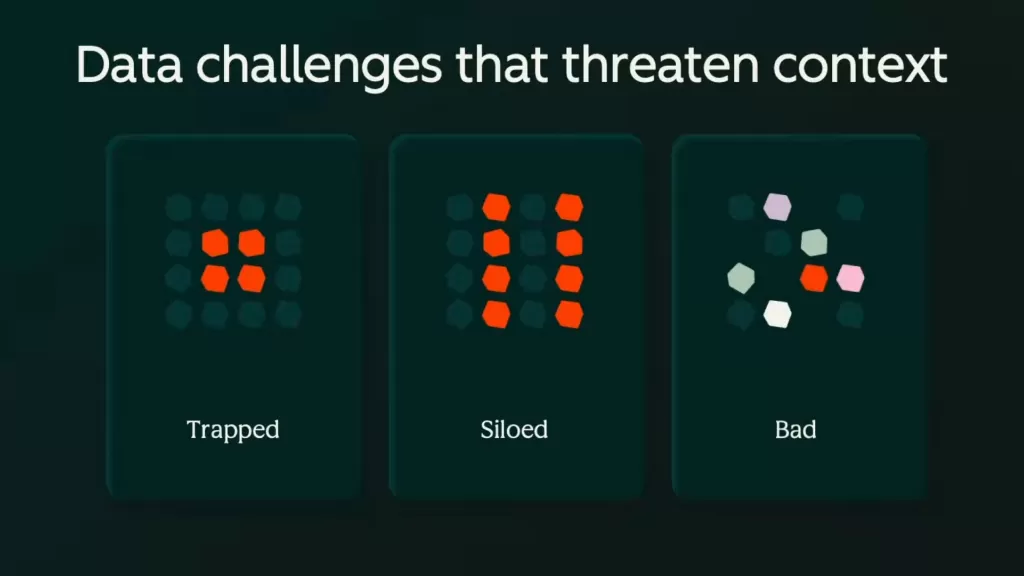
Most of your data is unstructured in emails, calls, chats, siloed across tools, or messy. Step 1 fixes all three; HubSpot brings a new AI-powered Smart CRM to turn this data into actionable insights.
1. HubSpot Smart CRM
Smart CRM helps users unify all trapped data under one CRM. Karen says that today, almost 80% of data is unstructured and stored in multiple ways, such as emails, calls, or conversations.
Smart CRM brings in the following features to collect and unify all this data for better context:
- Self-generating data: Automatically reviews call transcripts, support tickets, and emails to update records, log out-of-office replies, role changes, and intent signals like funding, expansion, or layoffs.
- Flexible views: Work with the same data as a board, table, or report.
- Smart Insights: One-click snapshot of what matters now, with an activity timeline, account notes, and column insights for changes like dropping health scores or heating deals.
- Smart Digest: Clear recommendations so the CRM gives intelligence, not just storage.
- Project Object: Manage projects in HubSpot, like deals or leads, with stages and snapshots for accurate cross-team coordination.
- Smart CRM unbundled: Available on its own with company and contact enrichment by default, so anyone can make HubSpot their data foundation.
2. HubSpot Data Hub
Karen announces that HubSpot has decided to graduate from the Operations Hub to the Data Hub, which is built for GTM teams that need all customer context in one place. Its features will help you overcome siloed and messy data and collect it under one source of truth.
- Data Studio: Connect external data sources such as Snowflake product usage directly into your CRM with field-level control.
- Smart Columns: Promptable enrichment like “show recent funding,” always up to date.
- Data Quality: AI-powered hygiene to dedupe, fix formats, enrich, and fill missing fields before the bad data hurts campaigns.
Step 2: Enable Your People
Once all the unstructured data is structured, it is time to help your team with the right AI-powered tools to amplify their operations precisely.
Karen explained how this step includes implementing Loop marketing through the new Marketing Hub and Sales Hub features.
1. Marketing Hub
- Marketing Studio (Express): Your collaborative home for campaign creation. Give it one idea, and it will draft a complete multi-channel strategy across social media, email, and more. Work together on a visual canvas, create more assets with Breeze, and assign tasks without switching tools.
- Segments (Tailor): Segments is the evolution of lists. Discover high-intent audiences with a simple prompt, then refine by behavior and engagement to target exactly who is ready.
- AI-powered Email (Tailor): Personalizes content for each contact using CRM context and chooses the best send time. HubSpot’s internal testing showed an 82% higher conversion rate. This extends to CTAs and landing pages for true hyper-personalization at scale.
- AEO: AI Engine Optimization (Amplify): Show up as a top answer in LLMs. Input what you sell and your ICP, get topic suggestions and specific recommendations in the blog editor, plus a competitive score that benchmarks your brand’s likelihood to appear.
- AI Referrals in Traffic Sources (Amplify): See when LLMs send you traffic and leads so you can double down on what works.
2. Sales Hub
- AI-powered CPQ for Commerce Hub (public beta): Breeze drafts quotes from Smart CRM context, suggests line items and terms, and adds a personalized cover letter. Built-in e-signature and smart sharing streamline review and sign. Everything writes back to Smart CRM, so your AI gets smarter each time.
Step 3: Build Your AI Team
When data and your loop marketing strategy are in sync, now is the time to build your AI team to help you easily implement and evolve your playbook.
While building your team, you must know the difference between these two AI assistants & AI Agents. And it’s easy to understand them through this quote:
“Every employee gets an assistant. Every team gets agents.”
1. Assistants For Every Employee
- Breeze Assistant: The HubSpot Breeze Assistant lives wherever you work. It prepares meeting briefs with objectives, talking points, deal context, and documents from Drive. Now, it has a memory feature that helps it learn your preferences and improve its outputs over time.
- Connectors: HubSpot connects directly with ChatGPT and Claude and has now introduced a HubSpot connector for Gemini. When you ask, “Tell me about the last five deals in HubSpot,” the connector recognizes the HubSpot context and lights up citations you can click to act on.
2. Agents As Digital Teammates
- Customer Agent (expanded): From ticket resolution to an always-on concierge that greets homepage visitors, qualifies leads, books meetings, and resolves issues across site, email, and WhatsApp.
- Data Agent: Creates smart properties with a prompt and pulls from the web, files, tickets, calls, and emails to keep CRM fields always current.
- Prospecting Agent (upgraded): Adds research, pattern recognition, and data analysis. You set rules like targets, follow-up caps, tone, and review steps. It adapts to new signals such as funding or expansion and nudges reps at the right moment.
Quick Snapshot: Which New HubSpot Products Did Karen Announce in IN25 That Help in Loop Marketing?
Here’s the list of new HubSpot launches made by Karen at her main stage session – HubSpot Spotlight at INBOUND 25:
- Smart CRM: Self-generating data, flexible views, Smart Insights, Smart Digest, Project Object, unbundled availability.
- Data Hub: This is the new name for Operations Hub. It includes Data Studio, Smart Columns, and Data Quality.
- Marketing Studio, Segments, AI-powered Email with 82% conversion lift in testing, AEO, and AI Referrals in Traffic Sources.
- AI-powered CPQ with built-in e-signature (public beta).
- Breeze Assistant with Memory, connectors for ChatGPT, Claude, and Gemini (coming soon), plus Customer Agent, Data Agent, Prospecting Agent, Breeze Marketplace, and Breeze Studio.
Quick Example of Implementing Them in Loop Marketing
Express
- Pick one campaign idea in Marketing Studio and spin up the plan on the canvas.
Tailor
- Use Segments to uncover a missed, high-intent audience and refine targeting.
- Convert one email program to an AI-powered Email for per-contact personalization and send-time optimization.
- Connect one external source in Data Studio and add a Smart Column for a live seller signal.
Amplify
- Turn on AI Referrals and track how your AEOs’ work contributes to traffic and pipeline.
Evolve
- Pilot one agent from Breeze Marketplace and customize it in Breeze Studio to run a real process, then iterate based on results.
Karen Concludes With
At the end, Karen shows a slide with a quick overview of which HubSpot tools help you build a solid, unbreakable hybrid team. So, whenever you are confused, open this image and check which tool will help you in which phase.